If the thought of laying out a curriculum vitae fills you with dread, a CV builder can feel like a rescue. You type your details into simple boxes and the tool hands you a formatted document, with the fonts, the spacing and the alignment all taken care of. Used well, these tools save real time and get a nervous writer over the blank page. Used blindly, they produce a CV that looks like everyone else's and says nothing memorable, or they charge you at the worst possible moment. As a recruiter I have read many builder made CVs, good and bad, and the difference is never the tool. It is how the person used it. Let me show you how to get the good without the bad.
This guide explains what a builder actually does, why people reach for one, the different kinds you will meet, where they let you down, and how to use one so that the finished CV still sounds like you. It also covers the one thing no builder can ever do for you, which is the very thing that wins interviews.
What a curriculum vitae builder does
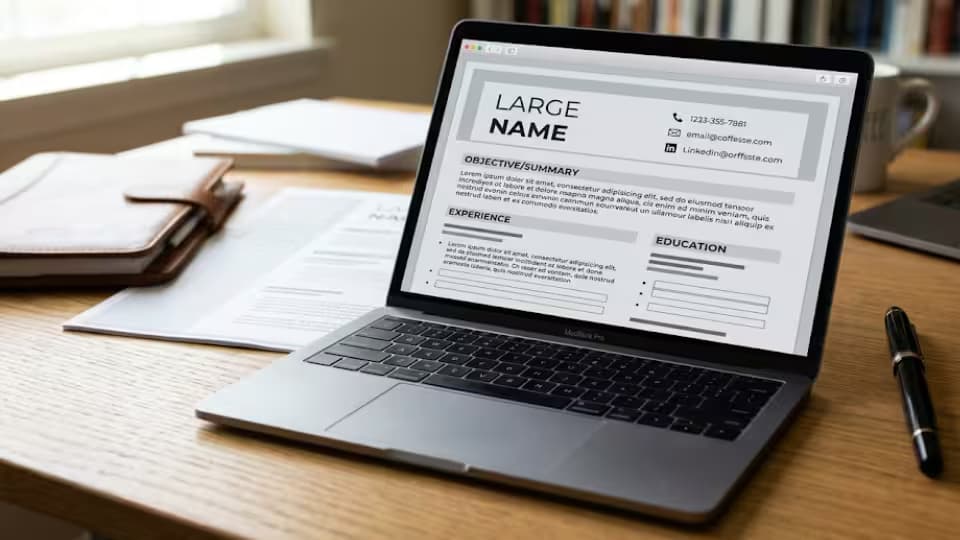
A builder is a website or app that asks you questions and turns your answers into a formatted CV. You fill in your name, your roles, your education and your skills, and the tool arranges them into a tidy layout, choosing the fonts and spacing so you do not have to. The picture below shows the idea, a set of simple boxes on one side becoming a formatted document on the other.

A CV builder turns simple answers into a formatted document
That is the whole promise of a builder. It separates the writing from the design, so you can focus on what to say while it handles how the page looks. For someone who finds formatting frightening or fiddly, that separation can be the difference between finishing a CV and giving up halfway.
Why people reach for one
The appeal is easy to understand. You do not need any design skill, because the tool handles how the page looks, which removes the part of CV writing that stops many people cold. It is fast, because you are answering prompts rather than wrestling with a blank document and arguing with margins. It removes the small formatting worries, such as whether your headings line up or your spacing is even, that quietly sap confidence. And many builders offer several ready made styles, so you can see your details in different looks and pick the one that suits the job. For a first CV, or for someone returning to job hunting after years away, that ease can be genuinely helpful.
The kinds of builders you will meet
Not all builders are the same, and it helps to know the types. Some are simple free tools that give you a formatted document with little fuss. Some are polished commercial services that offer many designs and extra features, and charge a fee, often as a subscription. And a growing number now use artificial intelligence to suggest wording for you, offering to write your profile or your job descriptions from a few prompts. Each kind has its place, but each also has its own trap, and knowing which kind you are using tells you what to watch for. The free ones may be basic, the paid ones may lock you into a subscription, and the artificial intelligence ones may put words in your mouth that are not true.
Where builders can let you down
There are traps, and you should know them before you start. Many builders are free to use but ask for payment at the very end, once you have spent an hour entering your details and only then try to download the finished file. Some produce wording that sounds generic, because the tool suggests the same phrases to thousands of users, so your CV ends up echoing countless others. Certain layouts lean on heavy columns and graphics that can confuse the software large employers use to scan applications. And once your content lives inside one builder, it can be awkward to move it out to another tool or to edit it freely. None of this makes builders bad. It just means you should go in with your eyes open and keep control of your own material.
How to get the most out of a builder
Used with a little care, a builder can serve you well. The habits below keep it working for you rather than against you.
1. Check the price before you invest time, so a download charge does not surprise you at the end.
2. Choose the simplest layout on offer, not the busiest, so your CV stays easy to read and easy to scan.
3. Replace every suggested phrase with your own words and your own real numbers.
4. Keep your details saved somewhere you control, such as a plain document, so you are never trapped in one tool.
5. Download the finished file as a PDF, and open it to check the layout holds.
6. Read the result on a phone as well as a computer before you send it.
Free or paid, which is worth it?
You do not have to pay to get a decent CV out of a builder, and for most people a free tool, or the free templates already inside Google Docs and Microsoft Word, will do the job. Paying can be worth it if a service genuinely saves you time you do not have, or offers a design you cannot find for free and truly need. Be wary of subscriptions that are easy to start and hard to stop, and of the common pattern where a tool feels free until the moment you try to download your work. Before you pay anything, ask yourself whether a free template would give you the same result with a little more effort. Often it would.
Artificial intelligence builders, a caution
A growing number of builders offer to write your CV for you using artificial intelligence, generating a profile or job descriptions from a few prompts. These can be genuinely useful for breaking the blank page and finding fresh wording when you are stuck. But they carry the most important warning of all. The tool does not know your life, so it will happily produce achievements and details that are not yours, stated with complete confidence. If you accept that wording without checking it, you may send a CV full of claims you cannot back up, and that falls apart the moment an interviewer asks about them. Treat an artificial intelligence builder as a drafting helper, never as a source of facts. Every line it produces must be checked, corrected and made true before it goes near an employer.
The part no builder can do for you
A builder can format your CV. It cannot decide what is worth saying. It does not know that you cut a delivery time in half, or trained the new starters, or turned around an unhappy client, or kept a shop running through a difficult year. Those are the lines that make a recruiter stop and read, and only you can supply them, because only you lived them. This is the heart of the matter. The formatting a builder handles is the easy, visible part of a CV. The thinking, the honest results, the specific numbers, is the hard, valuable part, and it stays firmly in your hands. Treat the builder as a tool that tidies your work, and keep the substance yours.
How a builder compares with a plain template
It is worth being clear about how a builder differs from simply using a template in Google Docs or Microsoft Word, because they solve the same problem in different ways. A template gives you a formatted document that you fill in and control completely, and it is free and yours to keep. A builder asks you questions and assembles the document for you, which can feel easier, but often at the cost of a fee to download and less freedom to edit. For many people a plain template is the better bet, because it is free and fully in their control. A builder earns its place when you find formatting genuinely stressful and value the guided, box by box approach enough to accept its limits. Neither is wrong. It is a question of how much guidance you want and how much control you are willing to trade for it.
What to enter, and what to leave out
A builder will happily give you a box for everything, and it is easy to fill them all just because they are there. Resist that. The same rules apply as for any CV. Enter your contact details, a short and specific profile, your work history with real results, your education, and the skills the job actually asks for. Leave out boxes that do not help your case, such as a long hobbies list or a row of skill ratings that mean nothing. A builder does not know which of its boxes matter for your job, so that judgment is yours. Fill the ones that make your case and quietly ignore the rest, even when the tool nudges you to complete them.
A worked example of fixing a generic line
Builders often suggest a line like responsible for a range of duties in a fast paced environment. It sounds busy, but it says nothing, and a reader has seen it a thousand times. Now make it yours. You might replace it with ran the front desk for a busy clinic seeing over eighty patients a day, and cut waiting complaints by half. Same box in the same builder, but now the line carries a real place, a real number and a real result. Do this to every suggested phrase the tool offers, and your builder made CV stops sounding like a template and starts sounding like a person worth interviewing.
Keeping your CV honest
Because a builder makes it so easy to accept ready made wording, it also makes it easy to let small untruths slip in, a slightly inflated title here, a borrowed achievement there. Guard against that. Everything on your CV should be true and something you can talk about with confidence in an interview, because the follow up questions will find anything that is not. An honest CV that is a little plainer will always beat an impressive one you cannot stand behind. The builder gives you convenience. You must supply the honesty, because the tool has no idea what is true and what is not.
The one time a builder is exactly right
For all the cautions, there is a situation where a builder is genuinely the best choice, and it is worth naming. If you find formatting so stressful that it stops you finishing a CV at all, a builder that walks you through box by box can be the thing that finally gets a complete, tidy document out of you. A finished CV built with a tool beats a perfect CV that never gets written because the layout defeated you. If that is you, do not feel you are taking a shortcut. You are using the right tool for the way your mind works, and as long as you supply honest, specific content, the result will stand up as well as any.
Getting your CV out of a builder
Before you commit to a builder, think about how you will leave it, because one day you will want to. The safest habit is to keep your own copy of everything you enter, in a plain document you control, so your career history never lives only inside one company's website. When you download your finished CV, save both a PDF and, where possible, an editable version, so you can adjust it later without returning to the tool. A builder should be somewhere you visit, not somewhere your CV is trapped. Keep the master in your own hands and you can move to any tool, or none, whenever it suits you.
Common mistakes people make
A few errors come up again and again with builder made CVs. People spend an hour entering details before checking whether the download costs money. They accept the tool's generic suggestions and send a CV that sounds like everyone else's. They pick a heavily designed layout that looks striking but confuses the scanning software. They let an artificial intelligence tool invent achievements they never checked. And they leave all their content locked inside one service with no copy of their own. Avoid these, keep control of your material, and a builder becomes a helpful shortcut rather than a trap.
Questions job seekers ask
Are CV builders free?
Some are, but many are free to use and then charge you to download the finished file. Always check the price before you invest your time, and remember that Google Docs and Microsoft Word include free templates that do much of the same job.
Do recruiters mind if I used a builder?
Not at all, as long as the CV is clear, specific and honest. A recruiter reacts to the content, not to the tool that formatted it. Fill the builder with your own real results and no one will hold the tool against you.
Will a builder made CV pass the scanning software?
It can, if you choose a simple layout. Heavy columns and graphics are the risk. Pick the plainest design the builder offers if you are applying through a large company's online system.
Should I let a builder write my CV with artificial intelligence?
Use it only for a first draft or for fresh wording, and check every line. The tool does not know your life and will invent details. Nothing it writes should reach an employer until you have made it true.
What if I want to leave the builder later?
Keep a copy of your details in a plain document you control, so you are never trapped. That way you can move to another tool, or edit freely, whenever you choose.
A final word
A curriculum vitae builder is a useful tool for anyone who finds formatting a struggle, as long as you remember what it is and what it is not. It handles the look of the page. It does not, and cannot, supply the honest, specific results that actually win interviews. Check the price, choose a simple design, replace every generic phrase with your own truth, keep control of your material, and check the finished PDF. Do that, and a builder gives you a tidy CV in minutes while leaving the part that matters, your real story, exactly where it belongs, with you.
Recruiter tip: Before you pay for a builder, remember that Google Docs and Microsoft Word both include free templates that do most of the same job. Try those first. Pay only if a builder genuinely saves you time you do not have.
Sources
• Google Docs Help, using templates