Most people do not freeze because they have nothing to say about themselves. They freeze because a blank page is intimidating. A template for your curriculum vitae removes that fear. It gives you a ready made shape to pour your own details into, so you spend your energy on what to say rather than on where to put it. As a recruiter I have no problem with candidates using templates. I have a problem with the wrong ones, and there are a great many wrong ones out there, dressed up to look impressive while quietly working against the people who use them.
This guide will show you what a good template is, why it helps, what to look for, which templates to avoid, and how to turn a template into a finished CV that sounds like you and not like a sample. By the end you will be able to open any template and know within a minute whether it is worth your time, which is a small skill that will save you many wasted hours.
What a curriculum vitae template really is
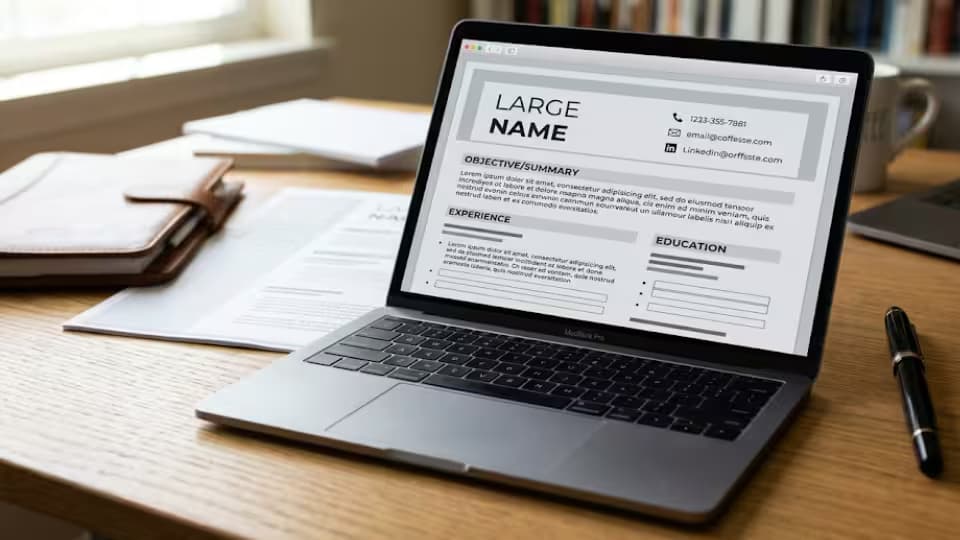
A template is simply a frame. It has the sections already laid out, the headings in place, and spaces marked out for your details. You keep the structure and replace every placeholder with your own words. Nothing more mysterious than that. A good template makes three quiet promises. It will keep your sections in a sensible order. It will keep the spacing and fonts consistent so the page looks calm. And it will leave you enough room to say what matters without cramming.

A CV template is a frame with placeholders you replace
Notice in the picture that the template does not do the thinking for you. It shows where your profile goes, where your experience goes, where your skills go. What fills those spaces is still yours to write. This is the most important thing to understand. A template arranges your story. It does not tell it, and it cannot know which of your achievements will make a recruiter stop and read.
Why a template helps you
A good template does three useful things for you. First, it saves time, because you are editing rather than starting from nothing, and editing is far faster than creating. Second, it keeps your sections in a logical order, so the reader finds things where they expect them, which matters a great deal to someone scanning quickly. Third, it makes the page look tidy, which quietly tells an employer that you are organized. A messy CV suggests a messy worker, fairly or not, and a clean template protects you from that impression before you have written a word.
There is a fourth benefit that people rarely mention. A template reduces the number of small decisions you have to make. Should the heading be bold? How much space before a new section? Which font? Every one of these choices is a chance to get stuck. A template answers them for you, so you can keep moving. Momentum is half the battle when writing a CV, and anything that keeps you moving is worth having.
The sections a good template already includes
Before you judge a template, check that it carries the sections a strong CV needs. It should have a header for your name, title and contact details. It should have a short profile near the top. It should have a clear work experience area with room for several roles, each with space for a few lines of achievement underneath. It should have an education section, a skills section, and somewhere to note achievements or certificates. If a template is missing any of these, you can add them, but a template that already has them in a sensible order has done half your work for you.
Be wary of templates that invent sections you do not need and give them pride of place, such as a large box for hobbies at the top of the first page. Space near the top is the most valuable space on your CV. It should carry your strongest material, not your taste in music.
What to look for in a good template
The best CV templates are the plainest ones. Look for a clean single column or a simple two column layout, a readable font such as Arial or Calibri, clear headings, and enough room for real content. The design should be almost invisible. When you look at a strong template, you should notice the words first and the design second, if at all. If a template looks like a poster or a magazine page, walk away. Your words should be the thing that stands out, not the design around them.
Check a few practical things before you commit. Does the template have all the sections you need, and can you remove the ones you do not? Is the font large enough to read comfortably, around eleven points for the body? Does it hold together when you add a second page? And does it still look right on a phone screen, since many people now read on their phones, including some hiring managers? A template that passes those checks is one you can trust.
The templates that quietly hurt you
Some templates look wonderful on screen and then work against you in ways you never see. Heavy graphics, colored blocks and unusual layouts can confuse the software that many employers use to scan applications, so your details may be misread or missed. Photos cause problems in countries where employers are advised not to consider them. Tiny fonts squeezed in to fit more text just make the reader give up. Two column templates that push your work history into a narrow side strip can break the reading order that the scanning software relies on, so your experience arrives jumbled or not at all.
Then there are the templates that are simply too clever. Timelines that snake across the page, skill bars that claim you are eighty percent good at something with no way to prove it, icons that replace words. These make a CV look designed, but design is not what wins interviews. Clarity is. If a template forces you to shrink your writing to make it fit, or to describe a skill as a percentage, or to drop a section you need, it is the wrong template, however beautiful it looks.
Matching the template to your career stage
The right template also depends on where you are in your working life. If you are a student or a recent graduate, choose a template that gives education a strong position and does not demand years of experience you do not yet have. If you are established in a career, choose one that gives your work history plenty of room and keeps education short. If you are moving into a new field, look for a template with a clear skills section, so you can show what carries across even when your job titles do not obviously match. One template does not fit every stage, and matching the frame to your moment makes the whole CV work harder.
Free templates and where to find them
You do not need to pay for a decent template. Word processors such as Microsoft Word and Google Docs include free ones built in, and they are perfectly good for most job seekers. Reputable career websites offer free templates too. Be a little careful with sites that offer a free template and then ask for payment when you try to download your finished CV, because you can lose an hour of work and then face a charge you did not expect. If you use Google Docs, there is a separate guide in this series that walks you through its template gallery step by step.
Whichever source you use, download in a format you control, and keep a copy of your own details somewhere separate, so that your CV is never trapped inside one website or one tool. Your career history is yours, and you should always be able to move it to another program if you choose.
How to make a template your own
A template is a starting point, not a finished CV. Treat it as clay. The single biggest mistake people make with templates is leaving the sample content in, so that a recruiter reads a profile that clearly belongs to the template maker and not to the candidate. I have seen CVs arrive with the placeholder still reading your name here. Do not be that person. Work through the template with care.
1. Replace every placeholder with your real details, and delete any bracket or sample line you do not use.
2. Remove sections you do not need, such as a hobbies section that adds nothing to your case.
3. Reorder the content so the strongest part sits near the top of the first page.
4. Rewrite any sample wording in your own voice, with your own real numbers and results.
5. Tailor the wording to the specific job you are applying for, matching the language of the advert.
6. Check the length, read it aloud once, then save the finished file as a PDF so the layout holds.
When you have done this, read the whole CV as though you were a stranger. Does it sound like a real person describing real work, or does it still carry the faint smell of a template? If it is the latter, keep rewriting until your own voice comes through. The template gave you the frame. Your job is to make sure nobody can tell which frame you used.
A quick worked example
Imagine a template offers this sample line under a job, control of daily operations to ensure smooth running of the department. It sounds fine, but it is empty, and it belongs to nobody. Now make it yours. You might write, ran daily operations for a team of twelve, and cut order errors by a third in six months. Same section, same template, but now the line carries a real person, a real team and a real result. That is the whole art of using a template. You keep the frame and you fill every line with something only you could say.
How a template handles a second page
Many templates look perfect on the first page and then break on the second. A heading gets stranded at the very bottom, a job splits awkwardly across the page turn, or the design element that framed page one does not carry over and page two looks bare. Before you trust a template, add enough dummy content to push it onto a second page and see what happens. A good template flows onto page two cleanly, keeps each job together, and looks like it belongs to the same document. If it falls apart, you will spend more time fighting the layout than writing your CV, and that is time you do not need to lose.
A short checklist before you use any template
Run any template you are considering through these quick questions, and reject it if it fails more than one. Can you read every word comfortably at arm's length? Are the section headings clear and consistent? Is there room for real achievements under each job, not just a single line? Does it avoid photos, skill bars and heavy graphics? Does it hold together on a phone screen and on a second page? Can the scanning software most large employers use read it, which usually means a simple single column or a light two column layout? A template that passes all of these is one you can build a career on, not just one application.
When a template is not the answer
Templates suit most people, but not every situation. If your career is unusual, with several trades, long gaps you want to explain, or a move across very different fields, a rigid template can force your story into a shape that hides your strengths. In those cases you may do better starting from a plain document and building the sections around your own path. The template is a servant, not a master. If it is fighting your story rather than holding it, set it aside and build the frame yourself. There is a separate guide in this series on making a CV from a blank page for exactly this reason.
One template, many versions
Here is a habit that will serve you for years. Choose one clean template you trust, and build your full master CV in it. Then, whenever a job appears, make a copy and shape that copy for the role. You keep the design you know works, and you change only the content that needs changing. This is faster than hunting for a new template every time, and it keeps your applications consistent. Recruiters remember content, not clever layouts, so your energy is far better spent tailoring your words than chasing a fresh design for each application.
Common mistakes people make with templates
A few errors come up again and again. People leave sample text or placeholders in the final CV. They pick a heavily designed template that looks striking but confuses the scanning software. They shrink the font to force more text onto the page, making it a strain to read. They keep every section the template offers, even the ones that do not help them. And they choose a new template for every application, so their CVs look scattered and they waste time they could have spent improving their words. Avoid these and your template will help you rather than hold you back.
Questions job seekers ask about CV templates
Are free templates good enough, or should I pay?
Free templates from Microsoft Word, Google Docs or a reputable career site are good enough for almost everyone. Paying can be worth it if a service genuinely saves you time you do not have, but a plain free template that you fill in well beats an expensive one you leave half generic.
Is a colorful template better than a plain one?
For most jobs, no. A little color in a heading is fine, but heavy color blocks and graphics can confuse scanning software and distract the reader. A plain template that puts your words first is the safer choice, especially when you apply through a large company's online system.
Should the template have a skills bar showing percentages?
Avoid them. A bar that says you are ninety percent skilled at something means nothing, because there is no scale behind it and no proof. Name the skill in words and show it in your experience instead.
Can I use the same template for every job?
Yes, and you should. Use one template you trust and change the content for each role. Consistency in design is a strength. It is the words inside that need to change from job to job, not the frame around them.
Do employers know I used a template?
Some may recognize a very common template, and that is fine. What matters is not whether you used a template but whether your content is specific and real. Fill the template with your own results and no recruiter will hold the frame against you.
A final word
A template is one of the most useful tools a job seeker has, as long as you remember what it is for. It is there to hold your story neatly, not to tell your story for you. Choose a plain one, fill it with real and specific detail, shape it for each job, and never let the sample content survive into the version you send. Do that, and the template becomes invisible, which is exactly what a good template should be.
Recruiter tip: Open the template on a phone as well as a computer before you commit to it. Many candidates now read job adverts on their phones, and so do some hiring managers. If the layout falls apart on a small screen, choose a simpler one.
Sources
• Indeed, how to use a CV template
• Google Docs Help, using templates