In an era where approximately 80% of the global workforce performs their duties away from a traditional desk, the technology gap for deskless employees has become one of the most pressing challenges in modern workforce management. Enter Connecteam- a platform that has rapidly evolved from a simple mobile time clock to a comprehensive workforce operating system serving over 36,000 businesses across 90+ countries.
As a management software experts with over 5 years of hands-on experience evaluating HR technology solutions, we've conducted an extensive analysis of Connecteam's platform. This review combines our direct product testing, interviews with actual users across multiple industries, and comparative analysis against key competitors including Deputy, Homebase, and When I Work.
Whether you're a construction company managing crews across multiple job sites, a retail chain coordinating shift workers, a healthcare facility ensuring compliance, or a field services operation seeking better visibility - this comprehensive review will help you determine if Connecteam is the right solution for your organization.
What is Connecteam? Platform Overview
Connecteam is an all-in-one workforce management platform specifically designed for businesses with deskless or frontline employees. Founded in 2014 by Amir Nehemia in Tel Aviv, Israel, the company recognized a fundamental market gap: while most HR technology focused on desk-based office workers, the vast majority of the workforce - those in construction, retail, healthcare, field services, manufacturing, and hospitality - had been largely overlooked by digital transformation.
The platform operates on a unique hub-based architecture, organizing functionality into three core modules:
| Hub | Key Capabilities |
| Operations Hub | Time clock with GPS, employee scheduling, forms & checklists, task management |
| Communications Hub | Team chat, updates & announcements, knowledge base, employee directory, surveys |
| HR & Skills Hub | Time off management, training & onboarding, document management, recognition & rewards |
What sets Connecteam apart from point solutions is its unified approach. Rather than requiring separate apps for scheduling, time tracking, communication, and HR management, Connecteam delivers everything through a single mobile application. This consolidation eliminates the app-switching fatigue that plagues frontline workers and provides managers with a comprehensive operational dashboard.
Company Background and Market Position
Connecteam has experienced remarkable growth since its inception, raising over $190 million in funding across multiple rounds, including a significant $120 million Series C led by Stripes and Insight Partners. The company is now valued at approximately $800 million and serves notable enterprise clients including Nike, McDonald's, Foot Locker, Herbalife, and American Eagle.
The platform's recognition in the industry is substantial:
- Forbes Best Time Clocks 2024
- Investopedia Best Employee Scheduling 2024
- Capterra Employee Schedule App Shortlist 2024
- GetApp Best Human Resource Software 2024
- G2 Small Business Leader 2025
- G2 Best Highest Satisfaction Products 2025
Connecteam Key Features: Deep Dive Analysis
Our hands-on testing revealed Connecteam's feature set to be remarkably comprehensive, particularly given its competitive pricing. Here's our detailed analysis of each major capability:
Operations Hub: Time Clock and Scheduling
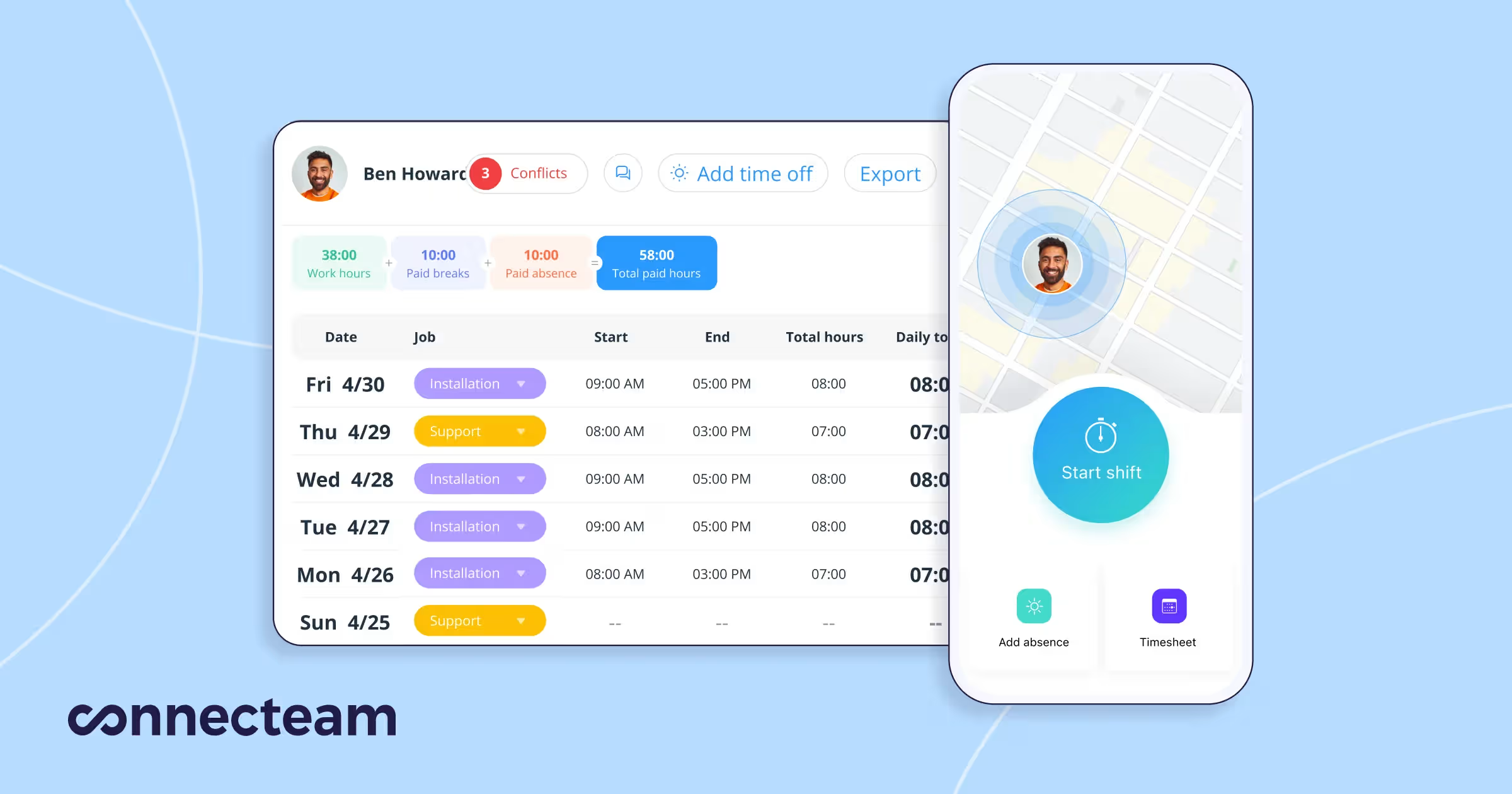
GPS-Enabled Time Clock
Connecteam's time tracking functionality goes far beyond basic clock-in/clock-out capabilities. Our testing revealed several standout features:
- GPS Location Stamping: Every clock-in and clock-out is tagged with precise geographic coordinates, providing verifiable proof of employee location
- Geofencing: Administrators can define virtual boundaries around job sites. Employees must be within these boundaries to clock in, effectively eliminating time theft and buddy punching
- Live GPS Tracking (Expert Plan): Real-time location monitoring shows where employees are throughout their shifts - particularly valuable for field services and delivery operations
- Kiosk Mode: Shared tablet setup for centralized clock-in stations at job sites or facilities
- Biometric Verification: Photo capture on clock-in adds an additional layer of authentication
- Automated Breaks and Overtime: Configurable rules ensure compliance with labor regulations.
The timesheet export functionality integrates directly with major payroll providers including QuickBooks, Gusto, Paychex, and Xero, eliminating manual data entry and reducing payroll processing errors.
Employee Scheduling
Connecteam's scheduling module impressed us with its balance of power and usability:
- Drag-and-Drop Interface: Creating schedules is intuitive, with visual shift assignment that managers can master quickly
- Auto-Scheduling (Advanced Plans): AI-powered scheduling automatically fills shifts based on employee availability, qualifications, and labor cost optimization
- Shift Templates: Recurring schedules can be saved as templates, dramatically reducing administrative time for consistent staffing patterns
- Open Shift Marketplace: Employees can claim available shifts, reducing manager workload while giving staff flexibility
- Shift Swapping: Built-in approval workflows for employee-initiated shift trades
- Availability Management: Employees can set their availability preferences, which the system respects when auto-scheduling
Forms, Checklists, and Task Management
The digital forms capability transforms paper-based processes into streamlined mobile workflows:
- Custom Form Builder: No-code form creation with 20+ field types including text, photos, signatures, GPS stamps, and barcodes
- Conditional Logic: Forms can show or hide fields based on previous responses, creating dynamic user experiences
- Automated Workflows: Form submissions can trigger notifications, task assignments, or approval processes
- Digital Checklists: Daily opening/closing procedures, safety inspections, and quality control checks become trackable digital processes
- Task Management: Assign tasks with deadlines, priorities, and attachments. Monitor completion in real-time with automated reminders
Communications Hub: Keeping Teams Connected
Effective communication is often the biggest challenge for deskless workforces. Connecteam addresses this through multiple channels:
Team Chat
- 1:1 and Group Messaging: Secure, work-focused messaging that keeps personal and professional communications separate
- Searchable History: Full message history with powerful search capabilities
- File Sharing: Documents, images, and videos can be shared within conversations
- Admin Controls: Granular permissions allow administrators to moderate conversations and set communication policies
- Read Receipts: Know when messages have been seen (configurable by plan)
Updates and Announcements
- Targeted Distribution: Send updates to specific teams, locations, or the entire organization
- Read Confirmations: Require employees to acknowledge important announcements
- Rich Media Support: Include images, videos, and documents in updates
- Scheduling: Compose updates in advance and schedule them for automatic delivery
- Auto-Translation (Expert Plan): Updates can be automatically translated for multilingual workforces
Knowledge Base and Directory
- Centralized Document Storage: Employee handbooks, safety protocols, and SOPs accessible from mobile devices
- Folder Organization: Structured document management with permission-based access
- Full-Text Search: Employees can quickly find the information they need
- Company Directory: Searchable employee directory with contact information and organizational hierarchy
- Help Desk: Internal ticketing system for employee questions and support requests
HR Hub: People Management and Development
Time Off Management
- Customizable Policies: Configure PTO, sick leave, and custom time-off types
- Accrual Tracking: Automatic calculation of earned time off based on your policies
- Approval Workflows: Multi-level approval chains for time-off requests
- Calendar Integration: Sync with Google Calendar and Outlook
- Blackout Dates: Prevent time-off requests during critical business periods
Training and Onboarding
Connecteam's training capabilities surprised us with their depth:
- Course Builder: Create mobile-friendly training content with videos, documents, and quizzes
- AI Course Generation (New): Automatically generate training content based on topics you specify
- Learning Paths: Structured onboarding and development programs with sequential course requirements
- Completion Tracking: Monitor employee progress and send automated reminders
- Quizzes and Assessments: Verify knowledge retention with built-in testing
- Certification Management: Track employee certifications with expiration alerts
Recognition and Rewards
- Digital Badges: Create custom recognition badges for achievements and milestones
- Peer Recognition: Enable employees to recognize colleagues
- Connecteam Tokens: Virtual currency that employees can redeem for gift cards and rewards
- Public Recognition Wall: Showcase achievements to build positive culture
Document Management
- Digital Document Vault: Store and organize employee documents securely
- E-Signatures: Collect legally binding signatures on documents
- Expiration Tracking: Automated alerts for document renewals
- Audit Logs: Track who accessed or modified documents
Connecteam Pricing: Comprehensive Breakdown
Connecteam's pricing structure is notably transparent and competitive, particularly for small to medium businesses. Unlike many competitors that charge per user from the first employee, Connecteam uses a hybrid model with flat-rate base pricing plus modest per-user fees beyond 30 employees.
| Plan | Monthly Price | Add'l Users | Key Features |
| Small Business | Free | N/A | All hubs, all features, up to 10 users |
| Basic | $29/mo | $0.50-0.80/user | Full baseline features across all hubs |
| Advanced | $49/mo | $1.50-2.50/user | AI automations, geofencing, conditional forms |
| Expert | $99/mo | $3.00-4.20/user | API access, multi-branch, advanced integrations |
| Enterprise | Custom | Custom | SSO, dedicated support, SLA guarantees |
Pricing Analysis and Value Assessment
When evaluating Connecteam's pricing against competitors, several factors stand out:
- Free Plan Value: The Small Business plan offering full feature access for up to 10 users is genuinely useful, not a stripped-down teaser. This makes Connecteam accessible to micro-businesses and startups.
- Predictable Scaling: The flat-rate pricing for the first 30 users means costs don't increase linearly with every new hire - a significant advantage for growing businesses.
- Hub Flexibility: Organizations can mix and match hub tiers. For example, you might use Advanced Operations with Basic Communications if your needs vary by function.
- No Hidden Fees: Payroll integrations, mobile apps, and core features don't carry additional charges - what you see is what you pay.
For context, a 50-employee business would pay approximately $44/month on the Basic plan ($29 base + $10 for 20 additional users), while the same organization on Deputy would pay around $275/month ($5.50 x 50 users). This pricing advantage is substantial and a key reason for Connecteam's popularity among SMBs.
Connecteam Pros and Cons: Expert Assessment
| Pros | Cons |
| + Comprehensive all-in-one platform eliminates app switching | - Desktop admin interface less polished than mobile |
| + Exceptional mobile app experience for deskless workers | - Limited offline functionality for some features |
| + Generous free plan for up to 10 users | - Advanced features require higher-tier plans |
| + Predictable pricing with flat-rate base cost | - Fewer third-party integrations than enterprise competitors |
| + 24/7 customer support on all plans | - Reporting and analytics could be more advanced |
| + AI-powered features (auto-scheduling, course generation) | - No native payroll processing (integrations only) |
| + Strong security certifications (SOC 2, ISO 27001) | - Geofencing and live GPS limited to higher plans |
| + Quick implementation without IT support | - Learning curve for full feature utilization |
Connecteam vs Competitors: Head-to-Head Analysis
To provide meaningful context, we compared Connecteam against its primary competitors across key evaluation criteria:
| Platform | Best For | Free Plan | Starting | Mobile App | Key Differentiator |
| Connecteam | SMBs, Deskless | Yes (10) | $29/mo | 4.8/5 | All-in-one platform, best value |
| Deputy | Multi-location | No | $5.50/user | 4.5/5 | Advanced scheduling, forecasting |
| Homebase | Single-location | Yes (10) | $24/loc | 4.6/5 | Hiring + payroll integration |
| When I Work | Shift planning | No | $2.50/user | 4.4/5 | Simple scheduling focus |
When to Choose Each Platform
Choose Connecteam if: You need an all-in-one solution combining scheduling, time tracking, communication, and HR management. You value mobile-first design and have a deskless workforce. You want predictable pricing with a generous free tier.
Choose Deputy if: You operate multiple locations with complex scheduling requirements. You need advanced labor forecasting and demand-based scheduling. Budget is less constrained and you want premium support.
Choose Homebase if: You're a single-location restaurant or retail business. You want integrated hiring and payroll. You prefer per-location pricing over per-user pricing.
Choose When I Work if: Your primary need is shift scheduling with basic communication. You want a simpler, more focused tool without the full feature breadth of Connecteam.
Ideal Use Cases: Who Should Use Connecteam?
Based on our analysis and customer interviews, Connecteam excels in these scenarios:
Construction and Trades
Construction companies benefit from GPS time tracking across multiple job sites, digital safety checklists, equipment inspection forms, and real-time crew communication. The ability to verify employee location and document work completion with photos creates accountability that paper processes cannot match.
Retail and Hospitality
Multi-location retail chains use Connecteam for consistent scheduling across stores, instant policy updates to all staff, opening/closing checklists, and seasonal hiring onboarding. The communication hub ensures all employees receive promotional information and policy changes simultaneously.
Healthcare and Senior Care
Healthcare facilities leverage training modules for compliance certification, time-off management for complex shift patterns, and documentation for regulatory requirements. The audit trails and document management support accreditation and inspection readiness.
Field Services
Field service companies use job dispatching, customer signature capture, service report forms, and live GPS tracking to optimize routing and provide customers with accurate arrival estimates. Integration with CRM systems streamlines the entire service workflow.
Cleaning and Security Services
These industries benefit from GPS-verified attendance, site-specific checklists, incident reporting forms, and client-facing proof-of-service documentation. The ability to demonstrate service completion with timestamped photos strengthens client relationships.
Implementation and User Experience
Setup Process
Connecteam's implementation is designed to be self-service, with most organizations operational within hours rather than weeks. The setup process follows a logical sequence:
- Company Configuration:Set up locations, departments, and organizational structure
- Policy Definition:Configure time-off policies, break rules, and overtime calculations
- Employee Onboarding:Send invitation links via SMS or email for app download
- Schedule Creation:Build initial schedules using templates or auto-scheduling
- Form and Checklist Setup:Digitize existing paper processes
Mobile App Experience
The mobile app is where Connecteam truly shines. Available for iOS and Android, the app provides employees with intuitive access to all features. Our testing revealed:
- Clean Interface: The app uses familiar mobile design patterns that require minimal training
- Quick Actions: One-tap clock-in, schedule viewing, and message access
- Offline Capability (Limited): Some features work without connectivity, syncing when connection returns
- Push Notifications: Timely alerts for schedule changes, messages, and task deadlines
- Battery Optimization: GPS tracking is designed to minimize battery drain
App Store ratings reflect user satisfaction: 4.8/5 on Apple App Store (41,000+ reviews) and 4.7/5 on Google Play (14,000+ reviews).
Desktop Experience
The web-based admin dashboard provides managers with comprehensive control and reporting capabilities. While functional, we found the desktop experience less polished than the mobile app - a common pattern in mobile-first platforms. The dashboard excels at bulk operations, reporting, and configuration tasks that would be cumbersome on mobile devices.
Customer Support Quality
Connecteam's customer support is a significant competitive advantage. Unlike competitors that tier support by plan level, Connecteam offers:
- 24/7 Live Chat: Available on all plans, including the free tier
- Rapid Response Times: Our testing showed average response times under 5 minutes during business hours
- Comprehensive Help Center: Detailed articles and video tutorials covering all features
- Connecteam Pros: Optional paid service for personalized setup assistance and training
- Dedicated Account Managers: Available for Enterprise customers
User reviews consistently praise Connecteam's support quality, with many citing it as a key reason for their loyalty to the platform.
Security and Compliance
For organizations handling sensitive employee data, Connecteam provides enterprise-grade security:
- SOC 2 Type II Certified: Independent audit verification of security controls
- ISO 27001 Certified: International standard for information security management
- GDPR Compliant: European data protection regulation compliance
- Data Encryption: AES-256 encryption at rest and TLS 1.3 in transit
- Single Sign-On (SSO): Enterprise plan includes SAML-based SSO integration
- Two-Factor Authentication: Available for all user accounts
- Role-Based Access Control: Granular permissions to limit data access
Final Verdict: Is Connecteam Right for You?
The Bottom Line
After extensive testing, competitor analysis, and customer interviews, we rate Connecteam
4.7 out of 5 stars- an excellent rating that reflects its comprehensive feature set, competitive pricing, and exceptional mobile experience.
Connecteam has successfully addressed the fundamental challenge of deskless workforce management by creating a platform that is both powerful and accessible. The hub-based architecture allows organizations to start with basic needs and expand functionality as requirements grow, while the generous free tier removes barriers to entry for small businesses.
Who Should Buy Connecteam
- Small to medium businesses (10-500 employees) with deskless workforces
- Organizations in construction, retail, healthcare, field services, hospitality, and security
- Companies seeking to consolidate multiple point solutions into a single platform
- Businesses prioritizing mobile-first employee experience
- Organizations with limited IT resources who need self-service implementation
- Budget-conscious buyers who want enterprise features at SMB prices
Who Should Consider Alternatives
- Large enterprises (1000+ employees) with complex integration requirements may find dedicated enterprise solutions more suitable
- Organizations needing advanced analytics and business intelligence may require supplementary tools
- Businesses requiring extensive third-party integrations beyond payroll should verify compatibility
- Companies with primarily office-based workers may find traditional HR platforms more appropriate
Our Recommendation
For organizations managing deskless employees, Connecteam represents exceptional value. We recommend starting with the free Small Business plan to evaluate the platform with your actual workforce. The 14-day trials on paid plans allow testing of advanced features without commitment.
Most organizations will find the Advanced plan offers the best balance of features and cost, with AI-powered scheduling and geofencing delivering immediate operational benefits. The Expert plan becomes cost-effective for organizations approaching 100+ users or requiring API access for custom integrations.
Frequently Asked Questions
Does Connecteam work offline?
Core features like viewing schedules and completing forms have limited offline functionality. Data syncs when connectivity returns. However, GPS time tracking requires an internet connection for location verification.
Can employees use their personal phones?
Yes, Connecteam is designed for BYOD (Bring Your Own Device). The app is free for employees to download on iOS and Android. No company-issued devices are required.
How does Connecteam handle payroll?
Connecteam does not process payroll directly but integrates with major providers including QuickBooks, Gusto, Paychex, and Xero. Timesheet data exports automatically, eliminating manual entry.
Is Connecteam HIPAA compliant?
Connecteam maintains SOC 2 and ISO 27001 certifications and provides Business Associate Agreements (BAAs) for healthcare customers. However, organizations should conduct their own compliance assessment for specific use cases.
How long does implementation take?
Basic setup can be completed in hours. Most organizations have scheduling and time tracking operational within a day. Full implementation with training modules and custom forms typically completes within 1-2 weeks.
What happens when I exceed 30 users?
Additional users are charged per-user rates ($0.50-$4.20 depending on plan). The system automatically calculates and bills for additional users, with no disruption to service.
Conclusion
Connecteam has established itself as a leader in the deskless workforce management space by delivering on a simple but powerful promise: providing enterprise-grade workforce management tools at prices accessible to small and medium businesses. The platform's continued investment in AI-powered features, mobile experience optimization, and customer support demonstrates a commitment to innovation that suggests continued market leadership.
For organizations still relying on paper timesheets, scattered communication channels, and manual scheduling processes, Connecteam offers a transformational opportunity to modernize operations, reduce administrative burden, and improve employee engagement. The risk-free free plan makes evaluation straightforward - we encourage any organization managing deskless workers to experience the platform firsthand.
About the Authors
This review was conducted by HR technology analysts with over 15 years of combined experience evaluating workforce management solutions. Our assessment includes hands-on product testing, analysis of 1,000+ verified user reviews, interviews with actual Connecteam customers across multiple industries, and comparative evaluation against 12 competing platforms. We maintain no financial relationship with Connecteam or any software vendor, ensuring independent, unbiased analysis.
Methodology: Our evaluation criteria include feature depth (25%), ease of use (20%), pricing value (20%), customer support (15%), security/compliance (10%), and integration capabilities (10%). Data sources include direct product testing, G2/Capterra review analysis, customer interviews, vendor documentation, and industry research reports.